


By Garrett Seeley
There is an issue in the field that can make some people uncomfortable: dealing with dust. It is one of the least desirable aspects of repairing medical equipment, yet it is unavoidable. The problem is particularly heavy in the summer and winter months when people spend most of their time indoors.
Dust accumulates in any device that uses air cooling, especially if a fan is present. Removing dust is part of preventive maintenance, and it reduces the likelihood of faults. Beyond maintaining a clean environment, dust also poses a significant risk to the equipment by obstructing air-cooled systems. Most computer-based medical devices are air-cooled, and over time, they can collect dust. So much so that their internal assemblies can often resemble that of a vacuum cleaner. This creates a significant risk of overheating and circuit damage, making it important to perform this task despite the challenges it involves.
DUST SOURCES & HEALTH CONCERNS
Dust is unhygienic and comprises of dead human skin, hair, mites, molds, bacteria, pollen, fabric fibers and airborne debris. Even the cleanest of environments can build up dust whenever people are present. Hospitals combat this with sealed clean rooms, HEPA filtration, independent air handling, and protective clothing like bunny suits and scrubs. These precautions protect the environment from human contaminants. Remember that healthy individuals could transmit infections to more vulnerable patients. These measures support hospital cleaning policies and are essential for any healthcare facility.
CLEANING TECHNIQUE
Because of this dust build up, regular disassembly and cleaning of air paths are required for most fan-cooled equipment. Always refer to the manufacturer’s guidelines for disassembly and cleaning instructions. Perform these tasks with the power off and the unit disconnected from AC or battery power.
For cleaning, use a static/ESD-resistant vacuum with a HEPA filter cartridge. Invest in a quality vacuum designed for electronics as they will be in use for years on delicate equipment. Vacuums with a blower option are best as they can help push out dust.
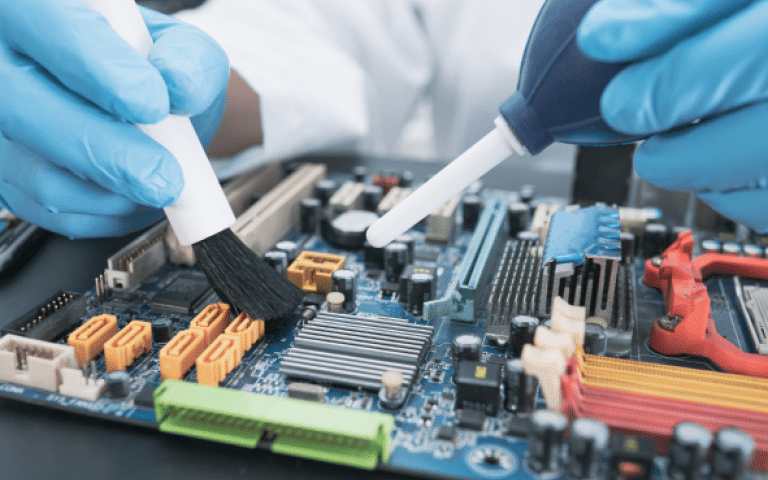
A good brush is also essential for dust removal. Choose ESD-safe brushes without metal or magnetic assemblies. Brush gently to avoid damaging components, allowing dust to flake off surfaces gradually. A vacuum can assist in removing this flaking dust as it falls out of the assemblies.
Compressed air is the best tool for removing dust, but not all compressed air is suitable. High-quality ESD-safe electronic vacuums may have a reverse port for blowing air, which is ideal for flushing dust from a system. Hospital air can also be useful but accessing it can be challenging. If an air compressor is used, make sure to have a humidity trap to prevent condensation ejection. When using canned air, be cautious and use it upright. Propellants can be ejected and there is a risk of freezing, which can damage circuitry. Remove sensitive components like optical drives before using compressed air as dust may damage them.
DUST MUST GO SOMEWHERE
Expect dust to spread everywhere, especially when using compressed air. Therefore, clean the work area afterward. Avoid performing this task in front of hospital staff who might find it repulsive. The best place for dust removal is an enclosed, ventilated area like a painter’s booth, where dust can be instantly removed from the building.
WHAT TO FOCUS ON
The most vulnerable electronic components include large heat sinks, transistors, computer chips, power supplies and video cards – generally, components that supply or use the most power. Video cards and computer processors are particularly difficult to clean because of mounted fans. Avoid spinning the fans with a vacuum or compressed air. This could generate unsafe electrical charges that might damage the circuitry. This is how spinning one fan causes another in a different part of the unit to spin. Don’t do that. Always hold fans stable during cleaning to prevent them from spinning.
FILTERING AND PLACEMENT AS PREVENTION
Some filter materials are washable and reusable, but most HEPA-grade filters are not. Refer to the manufacturer for guidance on cleaning filters. In general, HEPA filters should be changed regularly to remove unseen particulates. Finally, consider the unit’s placement; if an intake fan is located near the floor, it will suck dust from there into the system. Maintain an air gap between the floor and medical equipment to limit both dust intake and fluid intrusion.
SUMMARY
Dealing with dust is an unavoidable, yet critical, aspect of maintaining and repairing medical equipment.Accumulated dust, particularly prevalent during summer and winter, can obstruct air-cooled systems causing overheating and circuit damage. Hospitals strive to control dust through strict hygiene measures. Effective dust removal requires regular disassembly, cleaning of air paths and the use of tools such as ESD-safe vacuums, brushes and compressed air. The process should be performed carefully to avoid damaging sensitive electronic components. The clean environment should be swept and sanitized afterward. Proper filtering, unit placement and regular maintenance are vital in preventing dust accumulation. Dust removal ensures the efficient and safe operation of medical devices, underscoring its importance in biomed maintenance. Following these techniques will help reduce service incidents and possibly even extend the life cycle of the system.
