By Garret Seeley
In all the complexities of a modern hospital network, employees often take for granted the reliability of a network. Sure, it is obvious when a device will not communicate at all, such as when a cable is disconnected from a network switch. However, some troubleshooting involves looking for intermittent issues. This is especially true with wireless devices. Despite the biomedical field’s effort to reduce these intermittent issues, we still end up troubleshooting wireless systems. This is how.
Let’s first start by discussing an assumption. Namely, if the Wireless Medical Telemetry Service (WMTS) ruling by the Federal Communication Commission (FCC) should prevent a lot of telemetry problems. It does help a great deal. To summarize the history of the WMTS, since the early 2000s, medical devices were granted their own frequency. It is not supposed to conflict with surrounding wireless devices. This is called the WMTS band and is the 608 to 614 MHz range, just outside of the emergency services radios. To capitalize on newer GHz technology, a smaller section was created using the 1395 to 1400 MHz and 1427 to 1431 MHz bands. These frequencies are important as they describe who will compete for the same radio bandwidth, which is the individual channel used to communicate information.
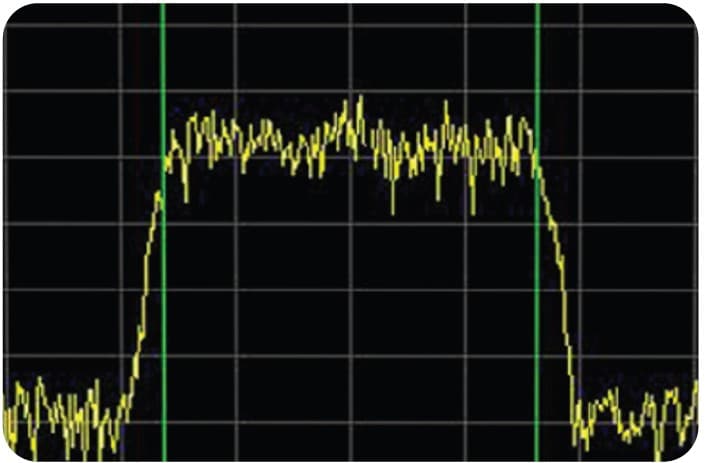
In theory, nobody other than a licensed WMTS system should be in operation around a medical facility. Such devices must be registered with the American Society for Healthcare Engineering (ASHE) to operate, this includes healthcare facilities departments. However, when there is a gap in transmissions, people try to gain access. In Austin, Texas, for example, the 1427 range is limited to a 1429 to 1431.5 MHz cap because of existing transmissions below 1429 MHz. Occasionally, television transmissions and the public use walkie-talkies and sometimes Ham radio will use the same frequencies as well. Although there are restrictions on newer equipment, existing transmissions were grandfathered into the law and may still affect WMTS telemetry systems.
For these reasons, we must use the same techniques to troubleshoot wireless networks in WMTS networks. However, due to the frequencies used, we cannot use standard tools such as off-the-shelf wireless network site scanners. For a biomed to check for interference, we must perform a site evaluation using a spectrum analyzer. There are a wide range of options ranging in price. Just make sure the frequencies the scanner is tuned to will include the entire range of 600 to 1500 MHz This is a typical frequency range for UHF transmissions. Often the scanners for that equipment will also tell if there is an interference in these ranges. When selecting an analyzer, I suggest one with a waterfall option, which records bands over time. In this way, it is easier to see periodic burst transmissions that a display may be too fast to see on the display. Try getting readings or scanning for transmissions in the area around the hospital or when the telemetry system is not in use, such as during upgrades. If need be, the waterfall or logging method can show spikes that interfere with the telemetry transmission. Keep in mind that the telemetry systems should list their frequencies of use, so setting the detection of signals that are being interfered with should be straightforward.
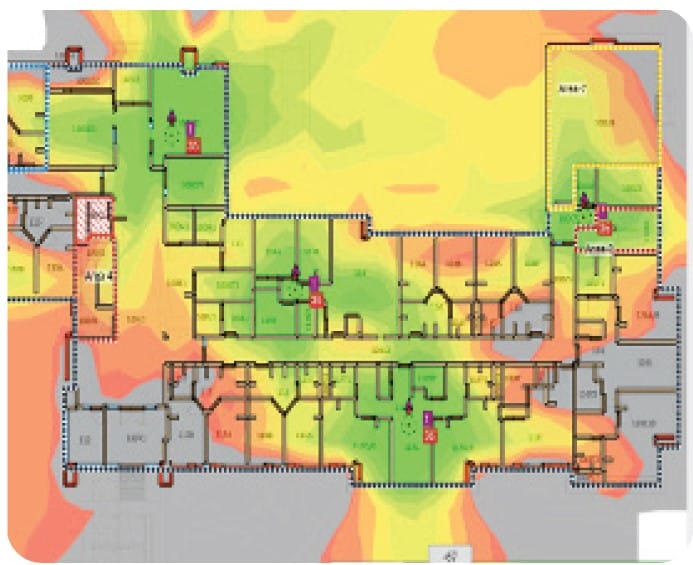
A way to see dead zones (a place without a signal) is with a heat map. In this technique, take measurements of the dB intensity of the telemetry signals and overlay this data on a floor plan. Use topographical map-style circles or groupings to show the intensity of transmissions and their locations. A heat map is typically shaded in color to describe the intensity of the transmission. This is a very useful tool when looking for losses in WMTS coverage. Such zones occur when a telemetry transmitter is the same distance to multiple access points. Much like a cell phone in a car, the transmitter doesn’t know which “tower” or access point to communicate with. In such areas, dropouts naturally occur. This effect is in every wireless network using multiple transmitters. A heat map is the easiest way to see inadequate coverage or potential dropout zones.
For familiarity, I suggest contacting IT for help troubleshooting wireless systems. Although their tools may differ, the concepts are the same. They have a great deal more experience troubleshooting wireless transmissions. They use heat maps and site scanners (networking-specific spectrum analyzers). Unlike biomeds, their equipment is not licensed, and the tools are much easier to get familiar with. Perhaps ask a friend in the field how they troubleshoot such issues. Remember to ask installers of WMTS systems if they are familiar with any of these techniques. You may be pleasantly surprised.