By Garrett Seeley
The evolution of medical equipment hardware benefits from the stability of new computer technologies. Although this progress is slow, computer hardware is much more stable when implemented in our field. This provides technicians with new, ever-changing options and applications. Two such innovations finding their way into medical equipment are the DisplayPort and USB-C interfaces. Each one presents new and interesting uses.
DISPLAYPORT
DisplayPort is a newer monitor connection, standardized in 2008 by VESA and became the standard for Ultra 4K video in 2014. It is mainly used on high-end computer monitors, like those in mammography systems, and is adaptable and backward. As a fully digital video signal with supplied power, DisplayPort supports embedded circuitry. Adapters can convert DisplayPort signals to HDMI, VGA, and DVI, allowing it to work with any monitor or TV if the correct cabling is used. Its transfer speed rivals that of USB-C, enabling multiple displays to run on a single port using a display hub or daisy-chaining. Although it currently mainly outputs video or sound data, it also provides audio transfer and control features.
USB-C
The USB-C port, dominant in external connectivity because of the smartphone market is also known as Thunderbolt or USB 3.2 (2015 version 3 of Thunderbolt). It was created in 2011 by Intel and Apple. USB-C handles audio, video, data, and power connections, combining the PCI-e computer bus and a DisplayPort video signal with up to a 40W DC power supply. It can act as a primary display interface, charger, and connection for peripherals and networks. Essentially an extension of the card bus, it offers nearly as fast external data or connection needs as adding a card to the computer. USB-C can route video card signals for additional displays and support hubs, multiplying the possible connections. Thunderbolt 5, based on the USB 4 standard, offers speeds of 120 Gbit (up to 15 GB per second) and 100W power connections through reinforced USB-C cables.
PITFALLS OF HUBS
Both USB-C and DisplayPort can supply voltage to external devices via their cable. This can eliminate the need for a power supply for the connected device. However, powered hubs, which allow multiple devices to share the same source signal, can cause issues when several devices are powered by the same cable. DisplayPort hubs can support up to four monitors using Multi-Stream Transport without requiring an external power supply. In contrast, USB-C hubs, especially docking stations, usually come with their own power supply to support multiple cable-powered devices. Be cautious of the number of devices running on a hub and their power sourcing.
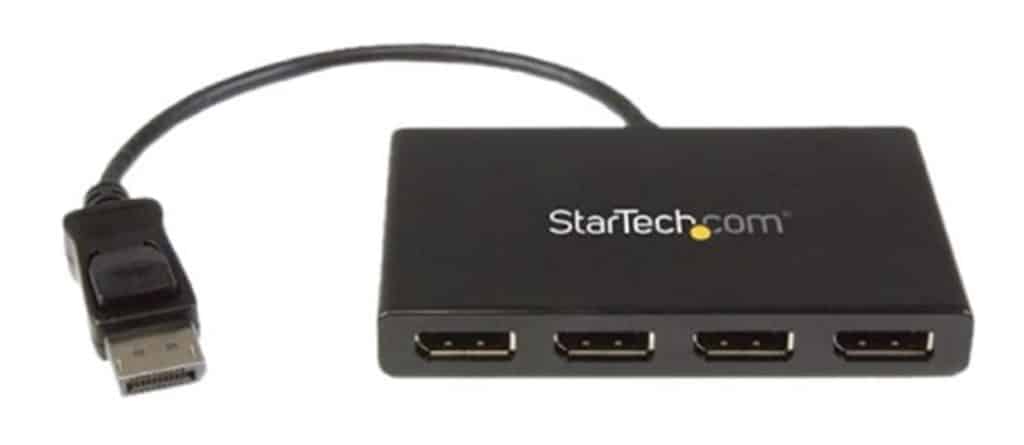
Data speed on hubs is divided among connected devices, requiring the video card to run one port fast enough to support multiple monitors, which can lead to lag or signal loss due to connection sharing. USB-C hubs have a daisy-chaining limit of seven, including the internal USB-C connection on the computer. It’s advisable not to use more than five daisy-chained USB-C hubs or devices. USB-C hubs can support multiple displays, with docking stations providing multiple fixed monitors and power for laptop charging.
MULTIPLE DISPLAYS
Supporting multiple displays requires DisplayPort v1.2 (2013) or Thunderbolt 3 (2015) or better connections, using Multi-Stream Transport technology, which allows for different content on each monitor. Ensure all hardware is compatible with this feature and refer to product manuals for configuration clarity. The video card, responsible for the video signal, needs sufficient memory and bandwidth for this connection, with video system control software like AMD Catalyst aiding in verifying capacity and speeds.
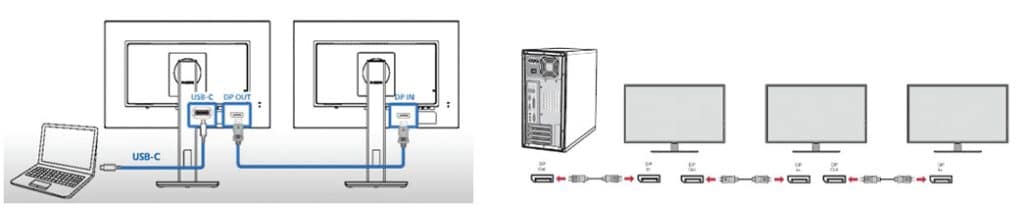
When daisy-chaining displays, it’s best for each monitor to use the same port, either DisplayPort or USB-C. This is a general statement for operability and is not always the case. Some monitors with integrated docking stations allow USB-C to support multiple DisplayPort monitors. On DisplayPort, the first monitor must use an upstream port, with a built-in hub potentially used thereafter. On Thunderbolt displays, each monitor requires both input and output ports, allowing daisy-chaining as setup and chain limits permit. Thus, one USB-C connector can handle up to five monitors. This is limited mostly by the video card’s bandwidth and memory capacity.
As the medical field continues to adopt these advanced technologies, technicians must stay informed about their functionalities and compatibilities. DisplayPort and USB-C offer significant benefits in speed, flexibility, and power management, enhancing modern medical equipment. By leveraging these interfaces correctly, medical professionals can ensure efficient and reliable device performance, contributing to improved patient care and streamlined workflows. Proper consideration and setting up of these technologies can greatly enhance operational capabilities in medical equipment.